Configuring iiNet VOIP (iiTalk) on the Nokia N9 (and N950)
Posted on Tue 13 September 2011 in MeeGo
The Nokia N9 running MeeGo 1.2 Harmattan is soon to be released here in Australia. I'm lucky enough to be in possession of a developers device, and I thought I'd post a quick follow-up on my previous guide for configuring iiNet VOIP (iiTalk).
Like it's predecessor (the N900), the Nokia N9 has completely integrated support for Mobile, VOIP, Skype, and Google Talk calls - you can make and receive calls on these services just like a usual mobile call, straight from the address book or dialing pad.
This means you can use the N9 with iiTalk, rather than using a headset hooked up to a computer.
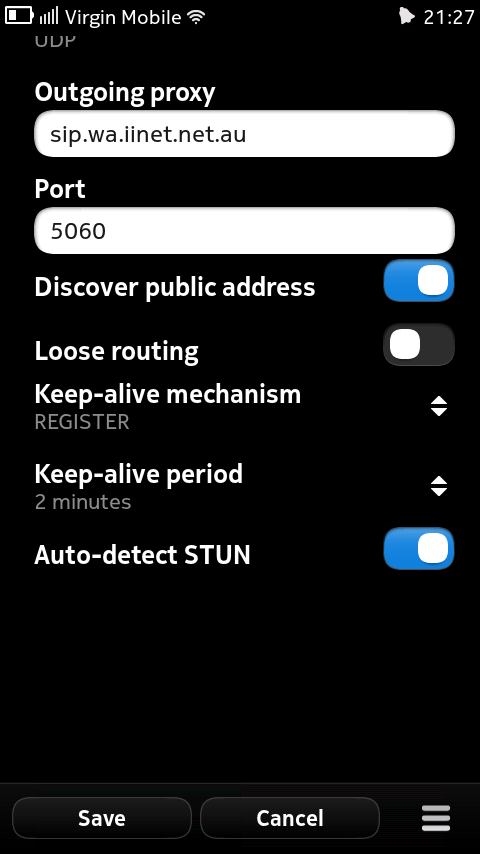
Here are the settings I configured on the phone:
Remember you will also have to configure port forwarding to the IP address of your phone on your wifi network – read iiNet's documentation for details.
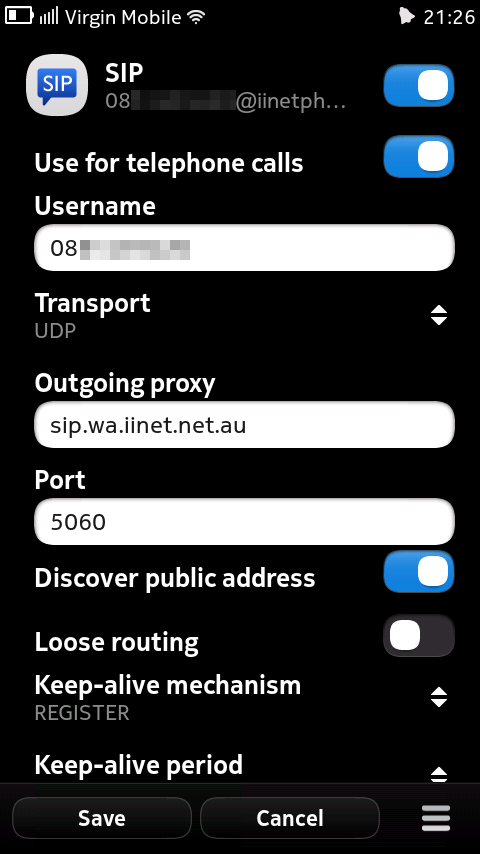
- User name: {your iiNet VOIP phone number}@iinetphone.iinet.net.au
- Password: {your iiNet VOIP password} (*it's different to your broadband password)
- Use for telephone numbers: Checked
- User name: {your iiNet VOIP phone number}
- Transport: UDP
- Outbound proxy: sip.{state}.iinet.net.au`
- Port: 5060
- Discover public address: Checked
- Loose routing: Unchecked
- Keep alive mechanism: REGISTER
- Keep-alive period: 2 minutes
- Auto-detect STUN: Unchecked